
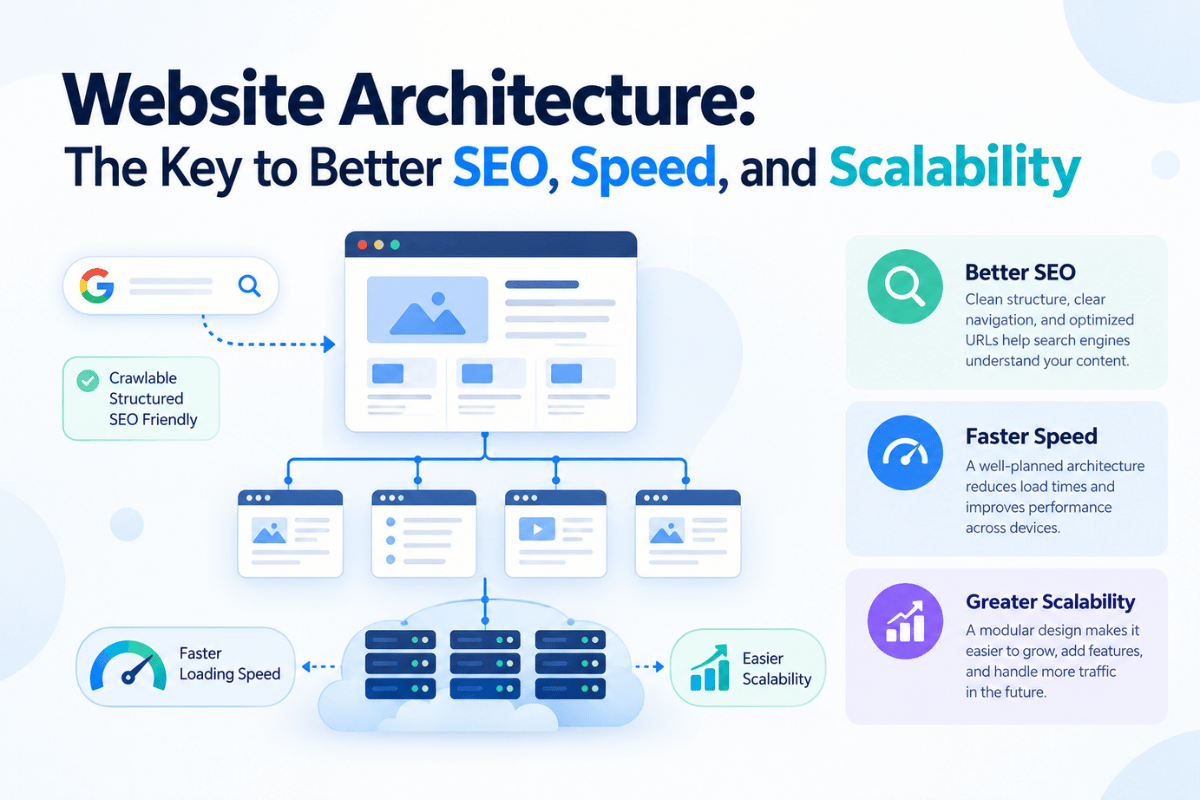
Ever wondered even after doing everything by the book, Google still is unable to index and rank your website higher?
Your content is great, the keywords look incredible, and you keep publishing new pages. Yet your website still struggles to rank. Users take too many clicks to find important pages and adding new content becomes increasingly difficult. The problem is not your content strategy but your website architecture is working against your SEO efforts.
This is where website architecture for SEO becomes important. Your architecture decides how pages, URLs, internal links, and navigation connect with one another.
A well-planned structure helps search engines crawl and understand your site. It also allows visitors reach important information with fewer clicks which supports future growth. In this guide,
we’ll explore how website architecture affects SEO services, the structures that work best for different websites, and the practices that help you build a faster and smoother site.
What Is Website Architecture and Why It Matters For SEO?
Website architecture (structure), is simply how all the pages on your website are organised and linked together. It shows users and search engines how different parts of your site connect, from your navigation and URLs to your internal links.
A good website structure implies:
- Simpler navigation: Visitors find information ASAP without clicking relentlessly.
- Easier crawling: Search engines find webpages easily without any interruptions.
- Connected pages: With related pages connected, your website authority improves.
| Term | What It Means | SEO Relevance |
| Website Architecture | The overall system that decides how pages, navigation, URLs, and internal links connect. | Helps search engines crawl the website and understand relationships between pages. |
| Website Structure | The hierarchical arrangement of pages, categories, subcategories, and individual content. | Creates a logical path from broad topics to more specific pages. |
| Information Architecture | How information is grouped, labelled, and presented so users can find it easily. | Improves navigation, content discoverability, and user experience. |
These three elements work together.
Information architecture determines how content should be organised from the user’s perspective.
Website structure turns that organisation into a page hierarchy.
Website architecture connects everything through navigation, URLs, and internal linking.
Why Website Architecture Matters for SEO and Business Growth?
Website architecture is more than just how visitors move around a website. It also decides how search engines discover pages, how authority flows between them, and how simply users move from finding information to taking action. A strong architecture supports both organic visibility and business growth.
Crawlability and indexing
Search engines need to discover and access your pages before they appear in search results. A logical hierarchy, descriptive URLs, XML sitemaps, and relevant internal links create clear paths for search engine crawlers to follow.
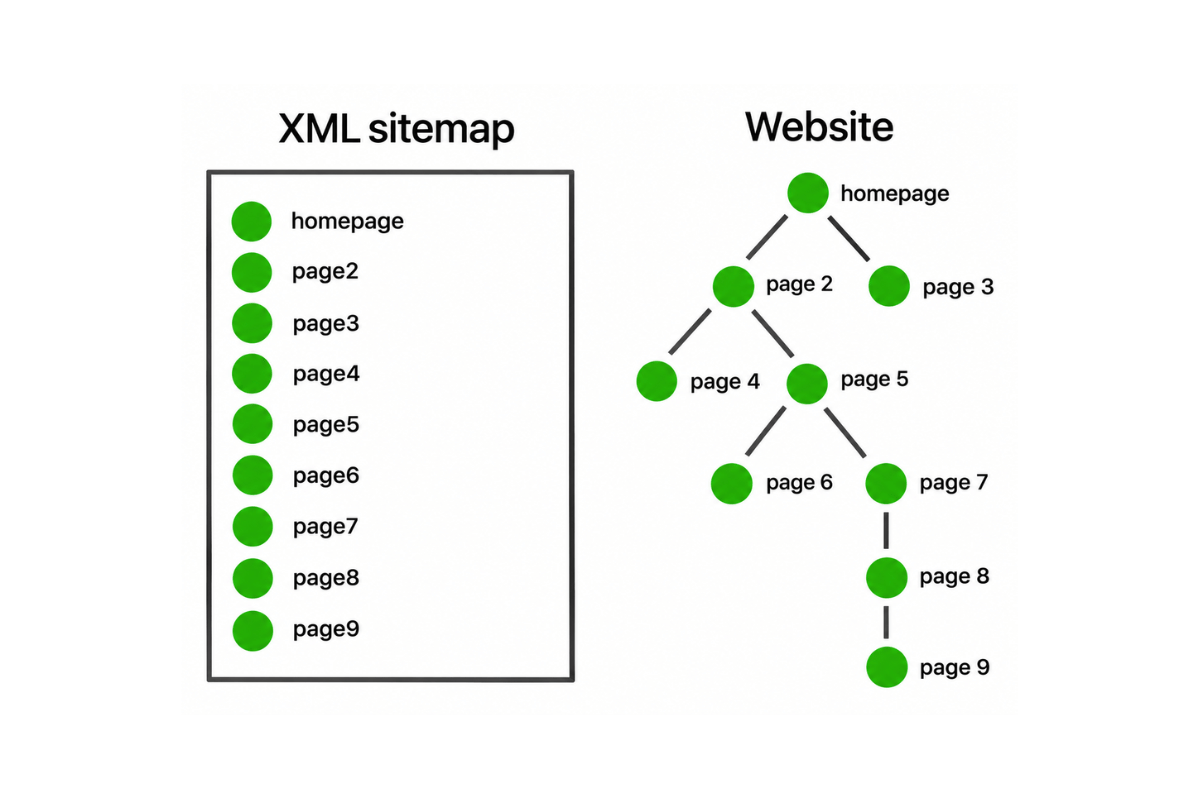
When important pages are deep within the site or left without internal links, search engines have a more diffficult time spotting and understanding them. A well-organised architecture keeps important pages accessible and supports more effective crawling and indexing across the website.
Link equity and click depth
Link equity refers to the value or authority that passes from one webpage to another through links. Internal links help distribute link equity from one page to another. When high-value pages link to relevant supporting pages, the authority generated across the website flows through a more organised structure.
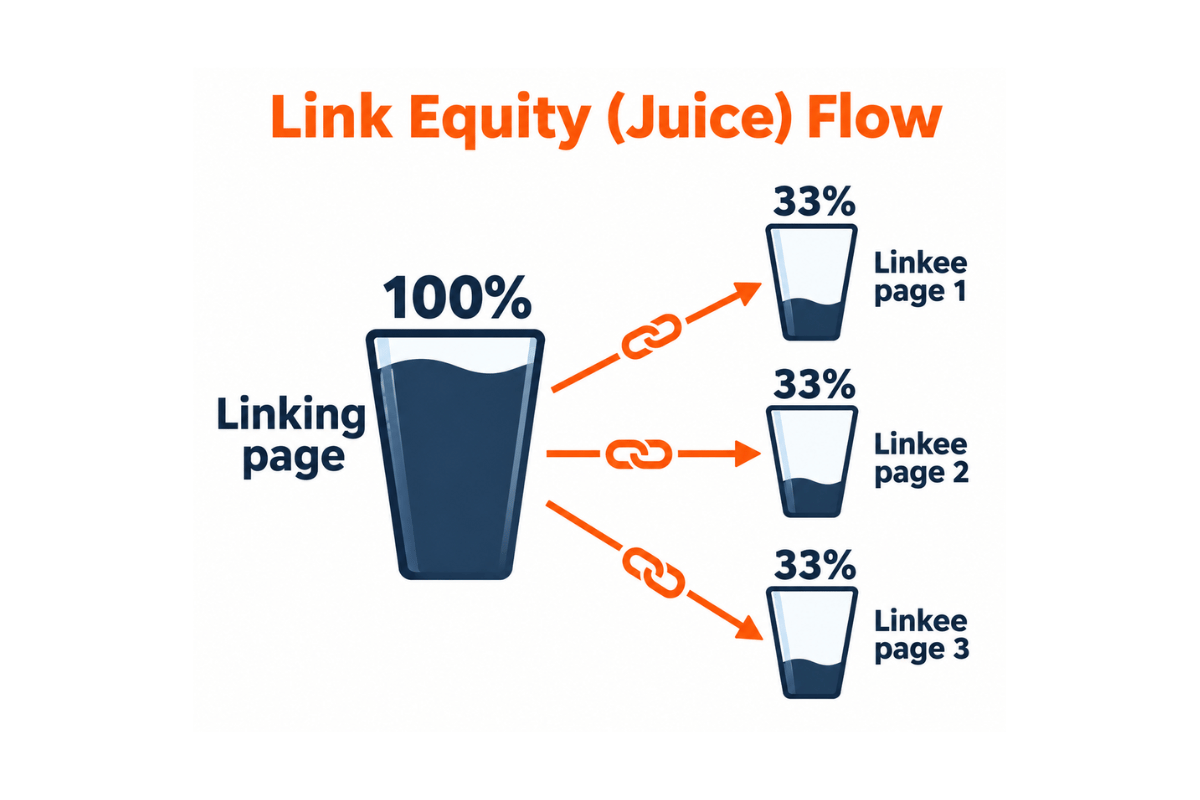
Click depth refers to the number of clicks required to reach a page from another starting point, usually the homepage. Pages that sit several unnecessary clicks away from the homepage have low click depth. They are harder for both users and crawlers to reach. Keeping important pages within a shallow, logical hierarchy improves access and gives priority pages stronger internal-link support.
User engagement and conversion paths
A visitor should move from one piece of information to the next without feeling lost. Clear navigation and relevant internal links create a natural journey from informational content to service pages, product pages, contact forms, or other conversion points.
A blog explaining common website performance issues should lead users towards a relevant web development or optimisation service page. This reduces friction, keeps users engaged with the site, and creates a better path towards a business action.
Building Topical Authority
Topical authority refers to the depth and breadth of a website’s coverage of a particular subject. Search engines look at the different pages of a website to understand how extensively it has covered a certain topic. Connecting a main topic page with similar supporting content builds a topical network.
A website selling WordPress development services will benefits from joining its core service page to resources covering WordPress security, website performance, plugins, themes, and maintenance costs. This structured content build depth around the subject.
Types of Website Architecture Models
Different website architecture models organise and connect content in different ways. The right model depends on the size of the website, the type of content it publishes, how users navigate it, and how easily the structure needs to grow over time.
Hierarchical, Sequential, Matrix, and Database Models
| Model | How it works | Best for |
| Hierarchial | Organises pages from broad categories into subcategories and individual pages, creating a clear parent-child structure. | Business websites, ecommerce sites, and large content websites |
| Sequential | Guides users through pages in a specific order, with each step leading naturally to the next. | Onboarding flows, courses, tutorials, and multi-step processes |
| Matrix | Lets users reach the same content through multiple paths based on different categories, filters, or relationships. | Large content libraries and websites with multiple navigation routes |
| Database | Uses structured data and moving relationships to generate and organise pages based on user queries or attributes. | Ecommerce platforms, directories, marketplaces, and large-scale databases. |
Major business websites use a hierarchical model as it provides the clearest foundation building a predictable relationship between the homepage, core service pages, supporting pages, and blog content.
Hub-and-Spoke and Siloed Architecture
Hub-and-spoke architecture focuses on a main hub page that links to multiple closely related supporting pages, while those supporting pages link back to the hub. This model works well for content clusters because it builds a clear relationship between a broad topic and the more specific questions surrounding it.
An SEO for business growth pillar page act as the hub, while supporting articles covering SEO services for business growth, technical SEO, website accessibility for business, and Core Web Vitals provide more detailed coverage.
Internal links between these pages help users move through the cluster while establishing stronger topical relationships.
Siloed architecture groups related content into different sections or silos. Pages within one silo mainly link to other relevant pages in the same section, creating clear topical boundaries. This structure works well for websites with several distinct services, industries, or product categories.
The two approaches serve different purposes. Hub-and-spoke is useful when content needs to work together as a topic cluster, while siloing helps separate major areas of a large website and prevents unrelated topics from becoming mixed together.
Flat vs. Deep Architecture
Flat architecture keeps important pages closer to the homepage, so users and search engine crawlers reach them with fewer clicks.
Deep architecture places pages several levels down within the hierarchy, often because the website contains multiple layers of categories and subcategories.
| Factor | Flat Architecture | Deep Architecture |
| Click Depth | Lower | Higher |
| Navigation | Simpler for most users | More steps between sections |
| Crawlability | Important pages are easier to reach | Deeper pages require more navigation paths |
| Growth | Works well for small and focused sites | Supports complex sites when organised carefully |
| Speed | Simpler structures reduce unnecessary navigation and requests | More complex structures require careful technical optimisation as the site grows |
The goal is not to make every website completely flat. A large website needs categories, subcategories, and supporting pages to remain organised. The priority is to avoid unnecessary depth.
As a website grows, its architecture needs to remain easy to navigate while its technical foundation continues to support speed and scalability.
This becomes particularly important for websites with large content libraries, ecommerce catalogues, or growing service sections. A well-planned architecture gives new pages a logical place within the existing structure instead of forcing developers to repeatedly restructure the website as it expands.
How to Build an SEO-Friendly Website Architecture
A well-designed website architecture starts with a structure that makes sense to both users and search engines. Each page should have a clear place in the hierarchy, a logical relationship with related content, and a direct path for discovery. The following steps help create an architecture that remains easy to crawl, navigate, and scale.
Create a logical URL structure
Your URL structure should reflect the organisation of your website. Descriptive, consistent URLs give users and search engines an immediate idea of what a page covers.
A simple structure also makes it easier to maintain the site as new pages are added.
| Good: example.com/services/web-development/wordpress-development/Less clear: example.com/page?id=2847 |
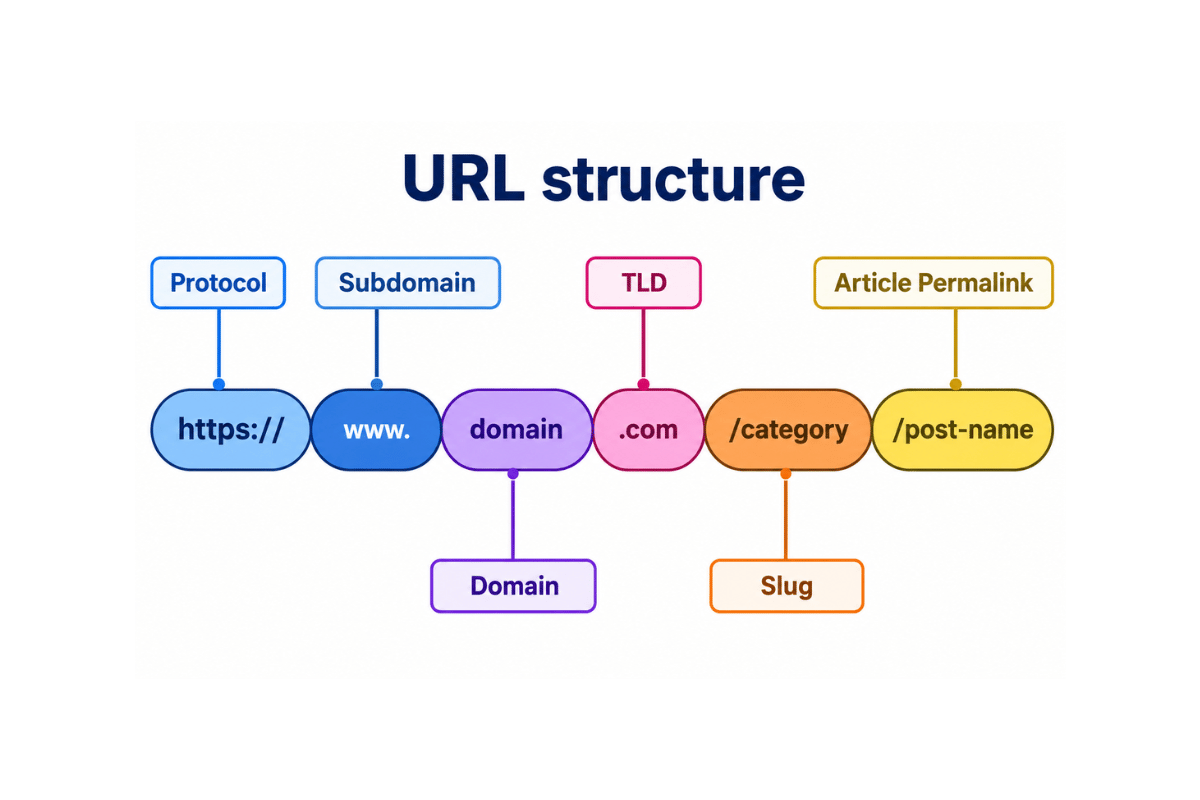
Follow these practices when creating URLs:
- Keep URLs short and descriptive.
- Include the primary topic or keyword where it fits naturally.
- Use hyphens to separate words.
- Keep the URL hierarchy consistent with the website structure.
- Avoid unnecessary parameters, numbers, or complicated folder structures.
- Maintain consistent URL formats across similar pages.
A logical URL structure also supports internal linking and helps users understand where a page sits within the wider website.
Connect related pages with strategic internal links
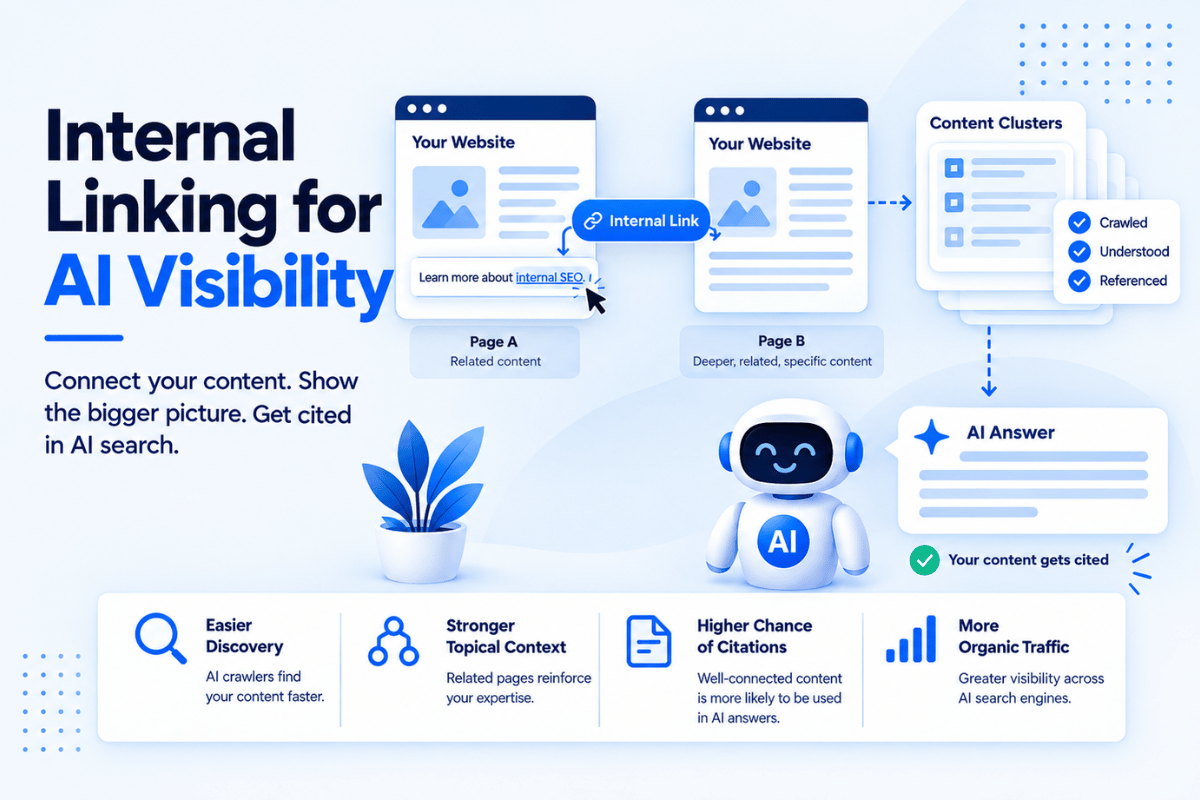
Internal links connect one page on your website to another page on the same domain. They help users discover related information while giving search engines additional context about the relationships between pages.
Instead of adding links wherever they fit, build them around genuine topic relationships. A service page should link to useful supporting content, while relevant blogs should guide readers towards deeper resources or commercially important pages.
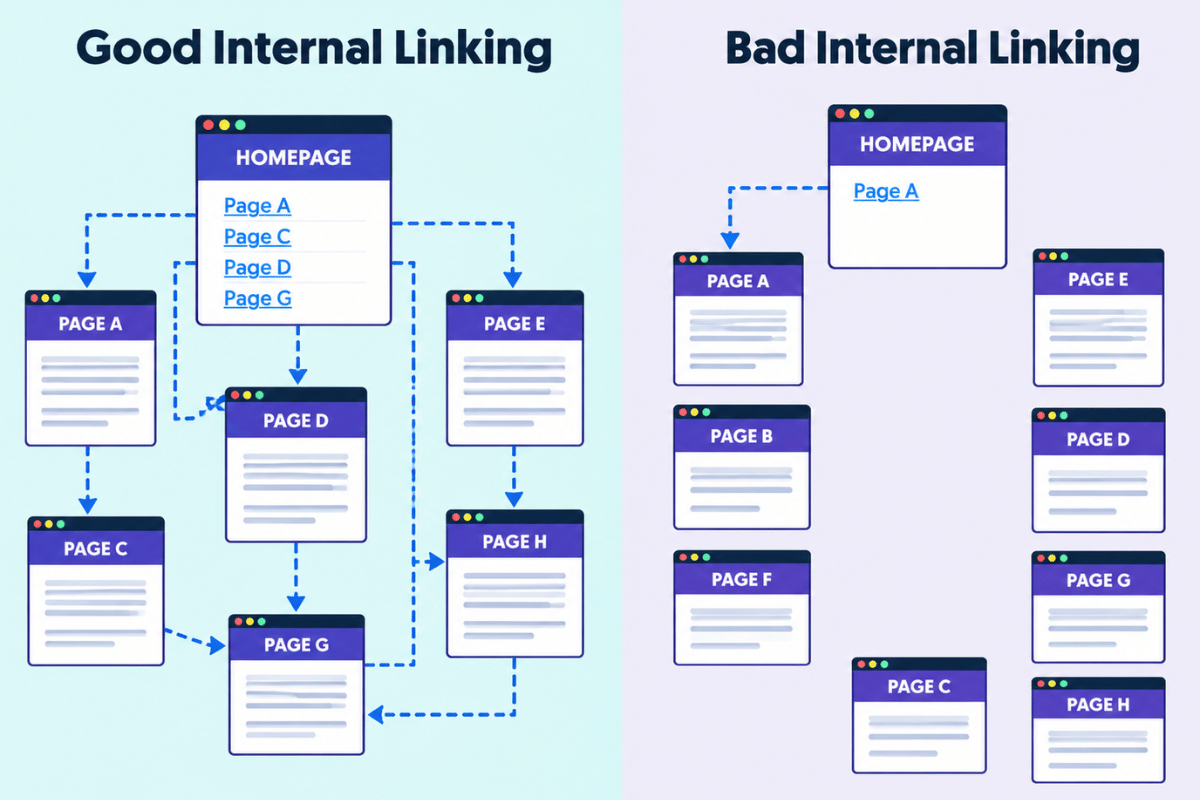
For strategic internal linking:
- Link from high-value pages to relevant supporting pages.
- Connect supporting articles back to their main pillar or service page.
- Use descriptive anchor text that tells readers what the linked page covers.
- Link related pages naturally within the body content.
- Focus on important pages that need greater visibility.
- Review older content regularly and add links to newer, relevant pages.
Menus, Breadcrumbs, and XML Sitemaps
Navigation shows the right pathway through your website. A clear menu helps visitors understand the site’s main sections, while breadcrumbs show where the current page sits within the hierarchy.
Keep the main navigation focused on your most important sections instead of attempting to include every page. Use descriptive labels that clearly communicate what users find after clicking them.
Breadcrumbs add another layer of context, especially on larger websites with multiple levels of content.
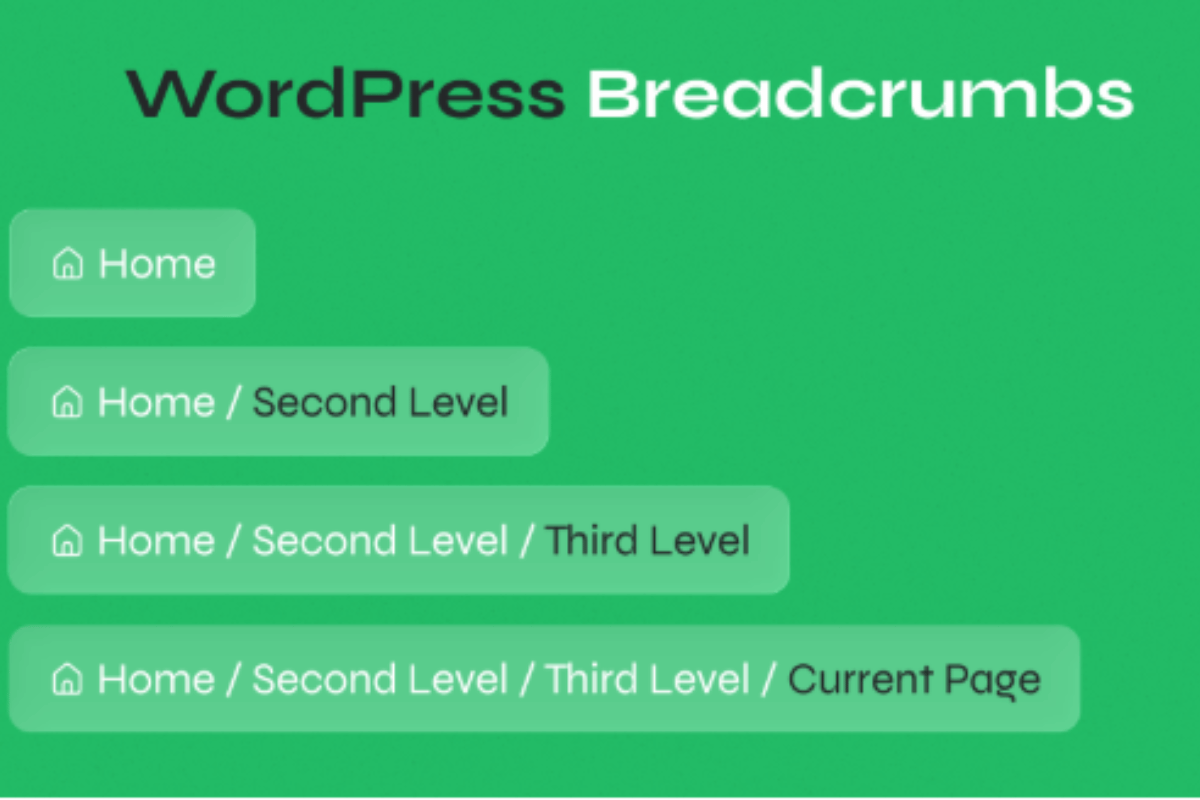
An example would be as follows:
| Home → Services → Web Development → WordPress Development |
This gives users an easy way to move back through the hierarchy and strengthen the relationship between parent and child pages.
An XML sitemap serves a different purpose. It provides search engines with a list of URLs that are available for crawling and indexing. While it does not replace internal linking or good navigation, it gives search engines an additional way to discover important pages.
Together, menus, breadcrumbs, internal links, and XML sitemaps create multiple clear paths through the website. This makes the architecture easier to navigate for users and easier for search engines to understand and crawl.
Common Website Architecture Problems and How to Fix Them
Even well-designed websites develop issues as new pages, products, categories, and features are added. These problems create unnecessary crawl paths, weaken internal linking, and make important pages harder to find if ignored. Identifying these issues early keeps your website easier to manage and supports long-term SEO for business growth.
Orphan pages and duplicate URLs
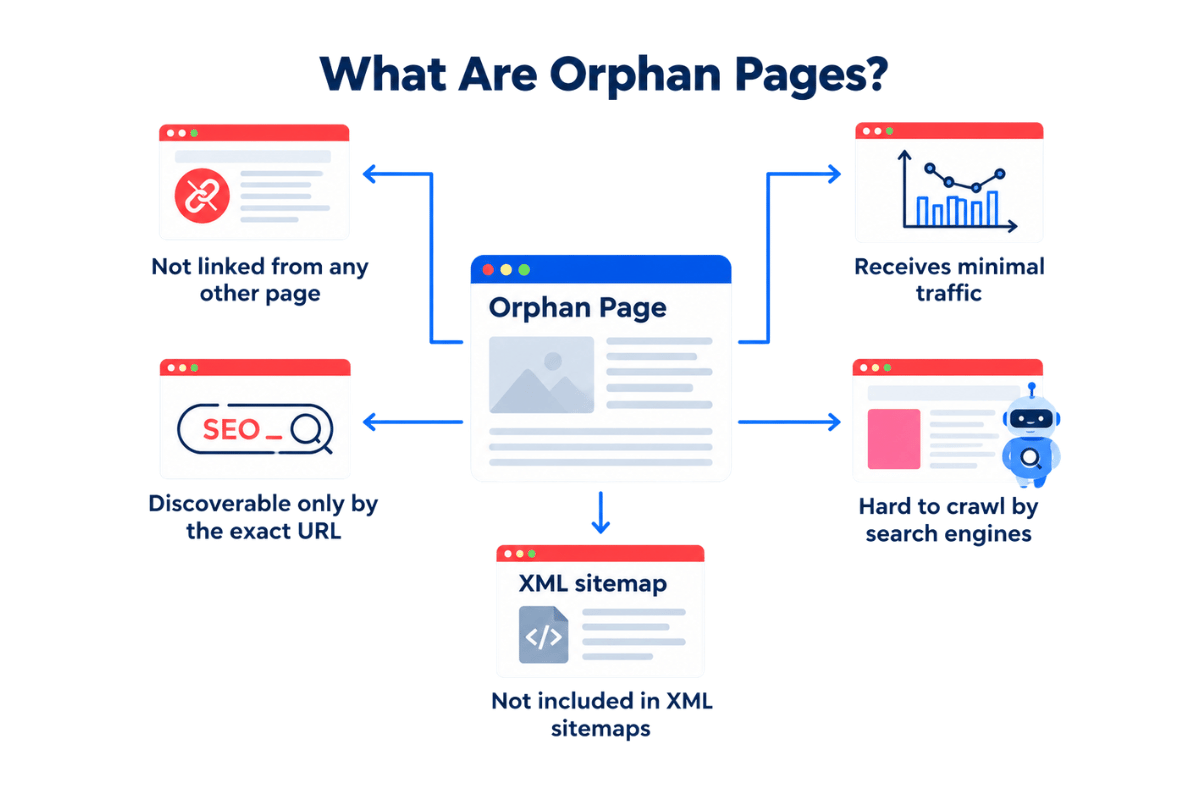
Orphan pages are pages that have no internal links pointing to them from other pages on the website. A search engine discovers them through other means like an XML sitemap or external backlink. The lack of internal connections makes their place within the site’s structure unclear.
Duplicate URLs create a different problem. The same or relatively similar content becomes accessible through multiple URLs, which makes it difficult for search engines to decide which version should be treated as the primary page.
To fix these issues:
- Add relevant internal links to orphan pages from authoritative and contextually related pages.
- Link important service, product, and pillar pages from appropriate navigation and supporting content.
- Use a consistent URL format across the website.
- Redirect irrelevant duplicate URLs to the preferred version.
- Use canonical tags when multiple URL variations are necessary.
- Regularly audit internal links and indexed URLs to identify pages that have become disconnected or duplicated.
The objective is simple: every important page should have a clear place in the architecture and a clear relationship with related content.
Faceted navigation
Faceted navigation allows users to filter and sort content based on attributes such as price, colour, size, brand, or category. It is particularly useful for ecommerce websites because it helps users narrow down a large catalogue quickly.
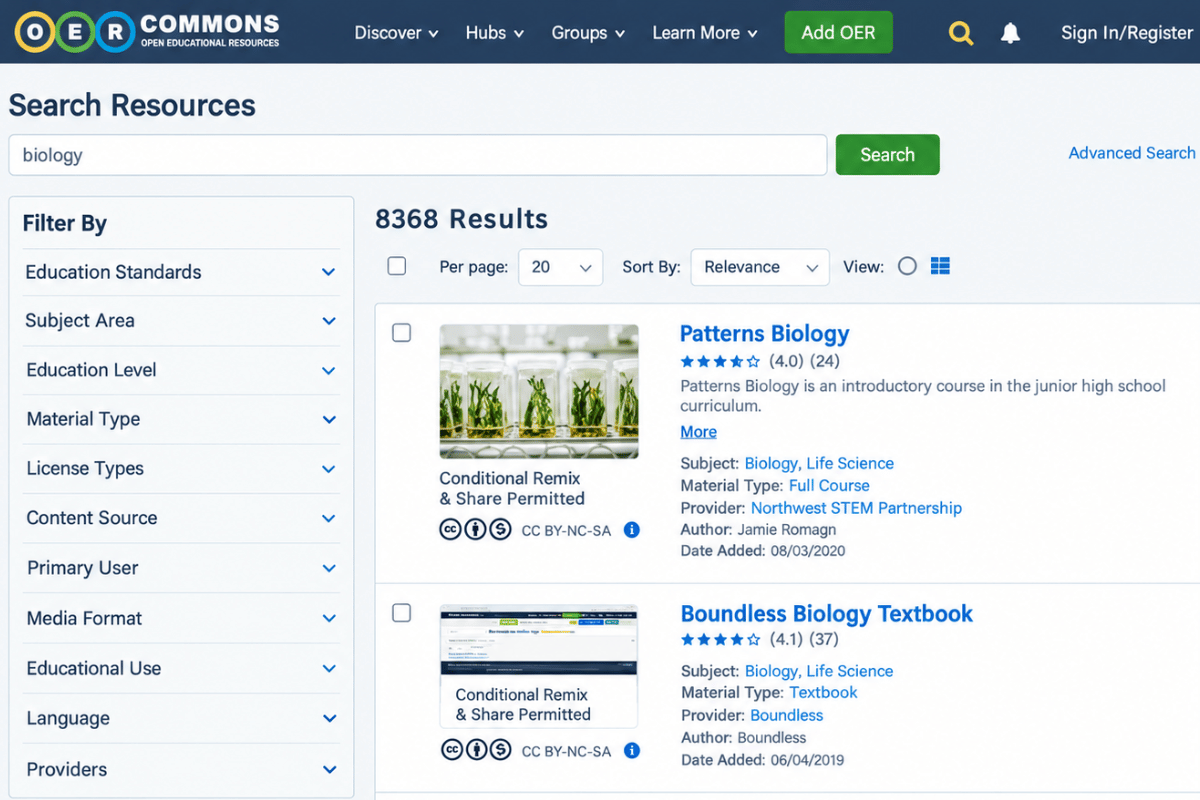
The SEO problem starts when every filter combination generates a separate URL. A website with hundreds of products and multiple filters can quickly create thousands of URL variations, many containing little unique search value.
A better approach includes:
- Identify which filtered pages have genuine search demand and deserve indexing.
- Prevent low-value filter combinations from becoming indexable.
- Use canonicalisation where appropriate to consolidate similar URL variations.
- Keep internal linking focused on valuable category and product pages.
- Control unnecessary URL parameters and filter combinations.
- Monitor crawl behaviour after making changes to faceted navigation.
The goal is to preserve the filtering experience for users without allowing the navigation system to create an unnecessarily large crawl space for search engines.
Site redesigns and migrations
A website redesign or migration often changes its URLs, navigation, page hierarchy, internal links, and technical setup at the same time. This creates a significant SEO risk because search engines previously understood the old architecture, while the new site introduces a different set of URLs and relationships.
A redesign should treat SEO as part of the architecture planning instead of a task after launch.
Before migrating, create a complete URL inventory and map old URLs to their corresponding new pages.
- Set up 301 redirects for URLs that have moved permanently.
- Preserve important content and high-value pages wherever possible.
- Update internal links to point directly to the new URLs.
- Review canonical tags, robots directives, and XML sitemaps.
- Test the new architecture on a staging environment before launch.
- Check for broken links, redirect chains, and orphan pages after migration.
- Monitor rankings, traffic, indexing, and crawl issues following the launch.
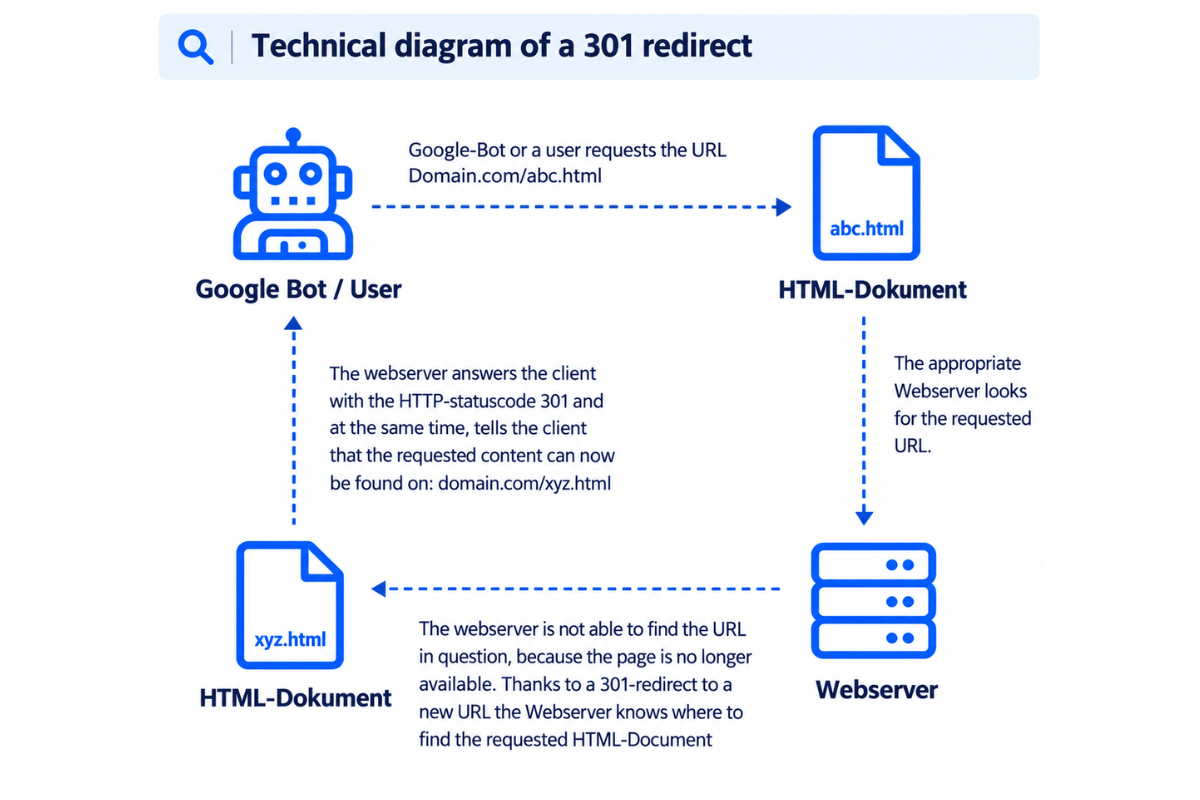
A migration that preserves the relationships between important pages protects the SEO value built by the old website. At the same time, it gives the new architecture room to improve usability, speed, and growth.
How Website Architecture Supports AI Search Visibility
The architecture that make a website easier to crawl, navigate, and understand for traditional search also support visibility across newer AI-based search experiences.
As search becomes more conversational and users ask more specific questions, clear page structures, strong internal linking, and well-organised content give search systems better context about your website and its individual pages.
Chunk-level retrieval and semantic clarity
Chunk-level retrieval refers to the process of identifying the most relevant portion of a webpage for a particular search query instead of relying only on the page as a single block of information. For AI-based search experiences, clearly separated sections make individual answers easier to understand in context.
This does not mean breaking every article into tiny pieces. The priority is still to create useful, well-structured content for people.
A semantically clear page should:
- Give each section a specific purpose and descriptive heading.
- Answer the question introduced by each heading directly.
- Keep related information together instead of scattering it across unrelated sections.
- Use consistent terminology and clear relationships between topics.
- Connect supporting pages through relevant internal links.
- Keep important information available as crawlable text.
Using Schema Markup
Schema markup is structured data added to a webpage to provide explicit information about what its content represents. It helps search engines understand details about content like articles, organisations, products, and breadcrumbs.
For example, an article about website architecture could use ‘Article’ structured data to identify details such as its headline, author, publication date, and modified date. A website’s navigation hierarchy could also use ‘BreadcrumbList’ markup to describe where a page sits within the site structure.
But schema markup is not a shortcut to AI search visibility.
There is no special schema markup specifically required for AI search. Instead, structured data works alongside strong content and technical SEO by giving search engines additional context about a page.
When implementing schema markup:
- Use the schema type that accurately represents the page.
- Make sure the structured data matches the visible content.
- Keep markup complete, accurate, and relevant.
- Validate the implementation using Google’s testing tools.
- Update the markup when the page content or structure changes.
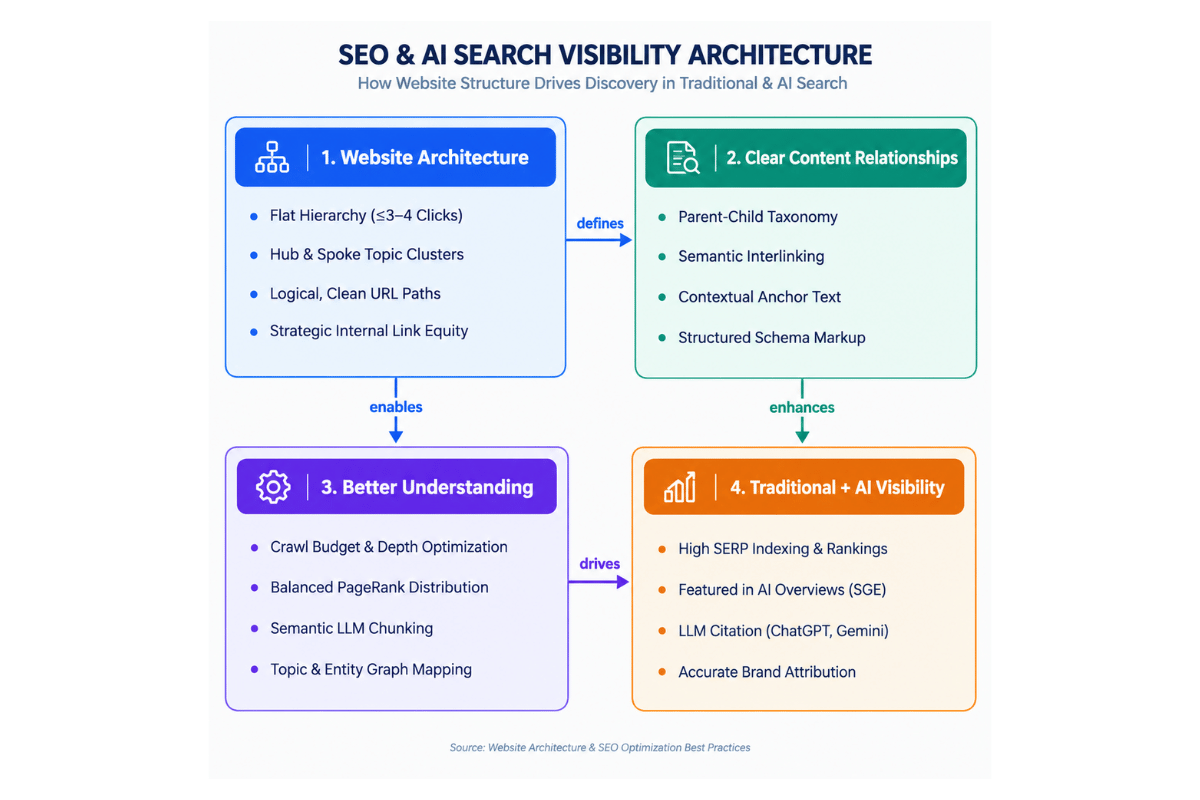
Clear architecture helps search engines understand how your pages relate, while clear content helps them understand what each page and section answers. Together, these foundations create a website that is easier to interpret across both traditional and AI-driven search experiences.
Build the Right Architecture Before Scaling SEO
A strong SEO strategy starts with the structure supporting it. Clear URLs, strategic internal links, logical navigation, shallow click depth, and well-connected content make it easier for search engines to crawl your website and for users to find and act on the information they need. When technical structure, content visibility, and user experience work together, your website builds a stronger foundation for SEO for business growth.
Scaling SEO on a weak architecture only creates more content around an already broken website. Fourfold Tech helps businesses build and improve the underlying website architecture with user-focused navigation, development, technical SEO foundations, and connected content structure. We give businesses a website, built to support stronger visibility and long-term growth.